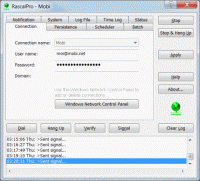
RascalPro enhances your dial-up session management and keeps your connection alive by simulating network activity and restoring the connection if it is lost. Other features include session scheduling, batch processing, file logging and time tracking.
Rascal is a broadband and dial-up connection manager that enhances your online experience with useful features not found in the standard Windows network tool. Rascal is fast, reliable and easy to use, making it a tool of choice for your DSL, Cable, VPN, ISDN and other dial-up connectivity needs.
Rascal helps you stay connected to the Internet by simulating network activity to fool idling detectors and by automatically restoring the connection if it is lost. A command line interface is available to run Rascal and control network connections remotely or from command prompts, scripts and batch processes. You can also set up audio alerts to be notified when a connection is opened or closed. Rascal provides you with information about your Internet sessions including network parameters, a calculation of your monthly fees, and a time log of how long you've been online for the current and previous session, day, week, month, and year.
For more demanding users, RascalPro supplements Rascal with the ability to schedule connection events, execute custom tasks when a connection is opened or closed, and log operations to a file for later reference. For instance, you can leave your computer and have RascalPro close the connection in your absence after a specified amount of time, perform late-night data transfers or run login and logout scripts.
Rascal works in the background while its tiny icon in the taskbar notification area changes its appearance to inform you about the current state of the program and its connection. You can quickly get online and offline by simply clicking on the icon.
If you need to keep a computer connected to the Internet without any human interaction, use our AppToService software to run Rascal or RascalPro as a Windows service that automatically reconnects the computer and monitors the connection following unattended reboots, without the need to log on. Whats new in version 3.0: Added Windows 7 support. Added 64-bit version. Overhauled the help guide and the installer. Requirements: 5MB of free disk space Operating system: Win7 x32,Win7 x64,WinServer,WinVista,WinVista x64,WinXP Release notes: Major Update
Telnet Magic is a flexible, efficient and inexpensive telnet client application for connecting Windows PC users to IBM mainframe, AS/400, and UNIX systems via TCP/IP. Telnet Magic delivers 3270, 5250, VT100, VT220 and ANSI terminal emulation.
Price: $ 40, Rating: 8, Downloads: 141 Download
Secure iXplorer is what you need for secure FTP, VNC and Terminal sessions over the otherwise insecure internet. All communication is secured by means of strong encryption using the SSH standard protocol.
Price: $29.90 $, Rating: 0, Downloads: 98 Download
- Block incoming calls from a specific phone number. - Block incoming calls from the phone number that partially matches. - Set whitelist for your mobile phone . - Block all unknown calls. - Log details for review.
Price: $19.95, Rating: 10, Downloads: 84 Download

 RascalPro 3.0 details